How to choose your Origin: lineage and class
Your character starts from two picks, a lineage and a class, together called your Origin. The lineage decides where your six stats begin. The class adds a smaller spread on top.
In the appSign-up, last stepForge your OriginStatBlockRPG
Every lineage spends exactly twelve stat points and every class exactly four, so no Origin is stronger than another, only shaped differently. If you signed up with StatBlockPro, you pick your Origin later, at the Awakening.
- Pick a lineage
Tap a picture in the Lineage row. The card under the row shows your pick: its flavour, the stat levels it adds and its passive. Tap any stat to see what it does.
- Pick a class
Tap one in the Class row below it. Once you have a lineage, Next: pick a class → takes you down to the row.
- Check the resultYour character at the top draws your character as the two picks make it, with its archetype and the levels they add, and Resulting stat block draws your starting levels as a hexagon.
- Create the character
Tap Create character. The button reads "Choose a Lineage and a Class" until both picks are made. Your character then wears the look its Origin drew, and Home offers Customise look once, to change it in the character creator.
The look comes from both halves: the lineage sets the build, the skin, the hair and the eyewear, and the class the outfit, its colour and, for some classes, an implant. Every piece of it is free.
The six lineages
| Lineage | STR | DEX | CON | INT | WIS | CHA | Leans on |
|---|---|---|---|---|---|---|---|
| Emberkin | 5 | 1 | 4 | 0 | 1 | 1 | STR Strength |
| Palewind | 1 | 5 | 2 | 1 | 2 | 1 | DEX Dexterity |
| Stonewake | 3 | 1 | 5 | 1 | 2 | 0 | CON Constitution |
| Luminarch | 0 | 1 | 1 | 5 | 3 | 2 | INT Intelligence |
| Tidebound | 0 | 1 | 3 | 2 | 5 | 1 | WIS Wisdom |
| Giltmoor | 1 | 2 | 0 | 2 | 2 | 5 | CHA Charisma |
The six classes
| Class | STR | DEX | CON | INT | WIS | CHA | Leans on |
|---|---|---|---|---|---|---|---|
| Vanguard | 3 | 0 | 1 | 0 | 0 | 0 | STR Strength |
| Strider | 0 | 3 | 0 | 0 | 1 | 0 | DEX Dexterity |
| Warden | 0 | 0 | 3 | 0 | 1 | 0 | CON Constitution |
| Archivist | 0 | 0 | 0 | 3 | 1 | 0 | INT Intelligence |
| Stillmind | 0 | 0 | 0 | 1 | 3 | 0 | WIS Wisdom |
| Envoy | 0 | 0 | 0 | 1 | 0 | 3 | CHA Charisma |
What each passive does
Every card also names a passive, and each one works on its own, beside the stat levels the Origin adds:
- Vanguard (class), "+3 STR from the start": that many levels on top of the stat's own, wherever your effective stats count, on the Hero tab and in every fight. Unlike gear, it never wears down.
- Emberkin (lineage), "+5% STR", Palewind (lineage), "+5% DEX", Stonewake (lineage), "+5% CON" and Strider (class), "+6% DEX": the stat's effective value rises by that percentage, in the same pool as your gear's and your buffs' percentages, so a lineage and a class on one stat add up: a Palewind Strider is +11% DEX.
- Luminarch (lineage), "+5% XP from everything you log" and Archivist (class), "+6% XP from everything you log": that much more on the XP multiplier of every activity and workout. The two add together, so a Luminarch Archivist (the Lumenscribe) earns +11%.
- Tidebound (lineage), "+8% loot luck" and Envoy (class), "+8% loot luck": added to your loot luck on every item you are given, from a quest, a streak chest, a dungeon floor or the forge, on top of what your streak adds. They add together: a Tidebound Envoy rolls at ×1.16 with no streak, which takes a Legendary roll from 0.80% to 1.30%. Drop odds in Settings shows your own table.
- Giltmoor (lineage), "+12% Scrap from quests, floors and chests": that much more scrap for a claimed quest, a cleared dungeon floor and a streak chest, rounded down, so a quest worth 20 scrap pays 22, and its card says 22. Dismantling an item and the Awakening's welcome pay what they always pay.
- Warden (class): a second party summon each day, 2 instead of 1. A party summon calls a friend's stats in to support one dungeon battle (see the Arena guide).
- Stillmind (class), "A fifth technique slot, carried into every fight". A Stillmind carries five techniques where everyone else carries four, and the fight screen draws the extra card in a row of its own, the screen's full width, under the other four.
What your archetype title means
Your lineage and class together give your character a title, its archetype: one of 36 names. A Stonewake Archivist is a Runecarver; an Emberkin Vanguard is a Forgebreaker.
It is a name only. It changes no number, and it follows from your Origin, so it is fixed once your Origin is.
| Lineage | Vanguard | Strider | Warden | Archivist | Stillmind | Envoy |
|---|---|---|---|---|---|---|
| Emberkin | Forgebreaker | Cinderrunner | Ashkeeper | Emberscribe | Coalheart | Hearthspeaker |
| Palewind | Squallguard | Windchaser | Stormward | Cloudreader | Hushgale | Whisperborne |
| Stonewake | Bulwarkborn | Screewalker | Cairnwarden | Runecarver | Deepstill | Stonespoken |
| Luminarch | Dawnguard | Glimmerstride | Lanternwarden | Lumenscribe | Clearlight | Beaconvoice |
| Tidebound | Surgebreaker | Tidestrider | Reefwarden | Saltscribe | Deepcalm | Currentspeaker |
| Giltmoor | Gildedguard | Marshstride | Fenwarden | Ledgerkeeper | Quietgilt | Goldtongue |
Where it shows
- On Home, under your name in the header.
- On the Hero tab, under your name and in the Origin panel as Archetype, with your Lineage and Class beneath it.
- In the Games hub's subtitle, which reads like "Jonah Reyes the Lanternwarden".
- On your public profile, for people viewing it in StatBlockRPG.
The six stats and what trains each one
Your character has six stats: STR Strength, DEX Dexterity, CON Constitution, INT Intelligence, WIS Wisdom, CHA Charisma. Each has its own level and its own XP bar, and none of them has a cap.
In the appFitnessTrainingActivitiesBoth dashboards
Everything you log trains them: an activity from the Activities list, a finished workout, a day in the food diary, all on the Fitness tab (the workouts and the activities on its Training part). Each activity gives base XP per unit to one or more stats, and in StatBlockRPG Activities shows which stats each activity trains; tap a stat to see what it does. The table shows a few per stat.
| Stat | Activity | Unit | Base XP per unit |
|---|---|---|---|
| STR Strength | Lifting Session | per set | STR 3, CON 1, DEX 0.25 |
| Kettlebell Work | per set | STR 3, CON 2 | |
| Climbing | per minute | STR 0.8, DEX 0.6 | |
| DEX Dexterity | Calisthenics Session | per set | DEX 3, STR 2, CON 0.5 |
| Mobility Work | per minute | DEX 1.2, CON 0.4 | |
| Boxing | per minute | DEX 0.8, CON 0.5 | |
| CON Constitution | Run | per km | CON 8, DEX 4 |
| Steps | per 1,000 steps | CON 5, DEX 2 | |
| Sleep | per hour | CON 7, WIS 4 | |
| Rest Day | per rest day logged | CON 20, WIS 15 | |
| INT Intelligence | Reading (pages) | per page | INT 1, WIS 0.35 |
| Study | per minute | INT 0.9, WIS 0.2, CON 0.1 | |
| Coding | per minute | INT 0.7, DEX 0.15 | |
| WIS Wisdom | Cooked a Meal | per meal | WIS 10, CON 5, CHA 2 |
| Meditation | per minute | WIS 1.5, INT 0.3 | |
| Journalling | per minute | WIS 0.9, INT 0.3 | |
| CHA Charisma | Time With People | per minute | CHA 0.7, WIS 0.25 |
| Craft | per minute | CHA 0.8, DEX 0.25 | |
| Hosting | per event hosted | CHA 12, WIS 4 |
Other ways to earn XP
- The food diary. A finished day of logged food pays up to 90 base CON XP, scaled by how well the day scored against your targets. The nutrition guide explains the score.
- Water. Reaching your water goal pays 25 base CON XP, once per game day. Food and water XP both pass through the daily soft cap below, but the XP multiplier does not apply to them.
- Daily quests pay scrap and items rather than XP. See quests and loot.
How XP turns into levels
A log becomes XP in three steps. The activity's rates give raw XP per stat, the daily soft cap turns that into granted XP, and the multiplier turns granted XP into the whole number added to the stat's bar.
Before you save a log, the log screen's You will earn panel shows exactly what it will award, worked out by the same rules. After you save, the confirmation reads like "40 XP earned", and a filled bar adds "1 level gained". Your levels are on the Hero tab, in Stat block.
The level curve
Moving a stat from level L to the next takes 40 × L1.6 XP, rounded up to the next 10. Each level asks a little more than the last, and the curve never stops.
| Level | XP to the next level | Total XP to reach it |
|---|---|---|
| Level 1 | 40 | 0 |
| Level 2 | 130 | 40 |
| Level 3 | 240 | 170 |
| Level 5 | 530 | 780 |
| Level 10 | 1,600 | 5,390 |
| Level 20 | 4,830 | 34,840 |
| Level 30 | 9,240 | 102,120 |
| Level 50 | 20,920 | 392,010 |
| Level 100 | 63,400 | 2,407,170 |
The daily soft cap
Each stat has a soft cap for the day, and every log fills it a little further. The first XP of the day counts almost in full; later XP counts for less and less, and a stat can never be granted more than its cap in one game day. Nothing is ever cut off, so a genuinely big day still pays more than an ordinary one.
An example: three lifting session logs of 10 sets in one day, for a character with every stat at level 10 and Weightlifting at level 5 (so each stat's cap is S = 145), on a 10-day streak (a multiplier of 1.06).
| Log | Raw STR XP | Granted | Awarded |
|---|---|---|---|
| Session 1 | 30 | 27.1 | 28 |
| Session 2 | 30 | 22.04 | 23 |
| Session 3 | 30 | 17.92 | 18 |
A workout saved late
A log counts on the game day you save it. A workout from the Fitness tab is the one exception: it counts on the day it started, so a session saved more than one day later earns less.
| Workout saved | XP it earns |
|---|---|
| The day it started, or up to one day later | In full |
| 2 to 3 days later | 50% of the usual XP |
| 4 to 14 days later | 25% of the usual XP |
What multiplies your XP
The XP granted to an activity or a workout is multiplied once, by a number built from three bonuses added together, and then halved if you are Over-Encumbered. The result is rounded down to a whole number.
| Part | What adds to it | Largest it gets |
|---|---|---|
| Base | Every log starts from it | 1 |
| Proficiency | +0.4% per level of the proficiency the activity trains | +60%, at level 150 |
| Origin | Luminarch +5%, Archivist +6% | +11%, as a Lumenscribe |
| Streak | +0.4% per day of your current streak | +20%, from day 50 |
| Over-Encumbered | Multiplies the whole sum | × 0.5 |
For example, a Lumenscribe with a level 20 proficiency on a 30-day streak earns × 1.31: 20 granted XP becomes 26. The streak itself is covered in quests and loot.
Over-Encumbered
Training hard every day without a recovery day eventually halves your XP. That is the game asking you to rest.
How 24-hour buffs work
A log also gives a temporary buff: extra stat points that count toward your stat totals, and so toward every fight in the Arena, for a day.
In the soft-cap example above, the first 10-set log gives +2 STR, +1 CON. A 5 km run at the same levels gives +3 CON, +1 DEX. Food keeps its own CON buff running, up to +6, sized by how well the day's eating scores and recalculated from the whole day each time you log.
You see buffs on the Hero tab in the Buff column, which says it plainly: "Buffs last 24 hours. Re-logging refreshes them; they never stack." On Home, Grit throws sparks while any is running.
Grit on Home
Grit, the app's mascot, sits at the left of the banner at the top of Home, in both dashboards. Its face shows your state before you read a number, and the banner turns amber when you are Over-Encumbered. The first state that applies wins, in this order:
| Grit looks | When | What it means |
|---|---|---|
| Tired, its eye half-closed | You are Over-Encumbered | XP is halved until recovery clears it, and the banner reads "Recovery due". |
| Fired up, its core bright and throwing sparks | At least one buff is running | What you logged is still adding to your stats. |
| At rest, its eye closed and still lit | Your last finished day was a recovery day | Your streak is safe. |
| Calm | None of the above | Nothing logged yet today. |
Proficiencies and how techniques unlock
Behind the stats sit 16 proficiencies, one per kind of work. Every activity trains exactly one, and every log adds the XP it awarded, across all its stats, to that proficiency.
A proficiency starts at level 1 the first time you log something that trains it and levels on the same curve as a stat. In the soft-cap example, the first 10-set log awarded 40 XP across its stats, so Weightlifting gained 40.
| Proficiency | Stats | Trained by | Unlocks |
|---|---|---|---|
| Weightlifting | STR CON | Lifting Session, Kettlebell Work | Level 10: Servo Break, Strength (Might) Level 30: Piston Drop, Strength (Might) |
| Calisthenics | DEX STR | Calisthenics Session, Martial Arts, Climbing, Boxing, and 3 more | Level 10: Overclock Step, Dexterity (Swift) |
| Running | CON DEX | Run, Steps, Walk, Hike, and 5 more | Level 10: Backup Cell, Constitution (Vital) Level 30: Slipstream, Dexterity (Swift) |
| Cycling | CON STR | Ride, Stationary Bike | None |
| Swimming | CON WIS | Swim, Rowing, Paddling | Level 30: Blast Plate, Constitution (Vital) |
| Reading | INT WIS | Reading (pages), Reading (time), Audiobook or Podcast | Level 30: Long Scan, Wisdom (Psyche) |
| Studying | INT CON | Study, Language Practice, Puzzles, Lecture or Course, and 2 more | Level 30: Hard Proof, Intelligence (Arcane) |
| Coding | INT DEX | Coding, Tinkering & Repair | Level 10: Zero Day, Intelligence (Arcane) |
| Cooking | WIS CON | Cooked a Meal, Protein Target Met, Meal Prep, Baking | None |
| Homekeeping | CON CHA | Homekeeping, Water, Laundry, Groceries, and 3 more | None |
| Sleep Hygiene | CON INT | Sleep, Rest Day, Sauna or Steam, Cold Exposure, and 1 more | None |
| Meditation | WIS INT | Meditation, Journalling, Breathwork | Level 10: Null Point, Wisdom (Psyche) |
| Mobility | DEX CON | Mobility Work, Yoga, Pilates, Dance, and 2 more | None |
| Craft | CHA DEX | Craft, Photography & Editing, Repairs and DIY, Drawing or Painting, and 4 more | Level 30: Grand Override, Charisma (Presence) |
| Fellowship | CHA WIS | Time With People, Pet Care, Call Someone, Eat With People, and 4 more | Level 10: Broadcast Rally, Charisma (Presence) |
| Leisure | WIS CHA | Gaming, Watching | None |
Techniques you carry
Techniques are what your character fights with in the Arena. Every account starts with two, matched to its best stat: a starter, its basic attack, and a special of the same damage type, its big hit (Stock Strike and Breach Charge for STR, Quickdraw Cut and Overdrive Dash for DEX, Plate Guard and Core Surge for CON, Boot Script and Logic Bomb for INT, Clean Feed and Null Signal for WIS, Open Channel and All Channels for CHA). A starter fights at rank 0.7, a special at rank 1.8 and only once per fight, and neither improves.
In the appHeroLoadout & SkillsTechniquesStatBlockRPG
Unlocking is automatic: a new technique appears on the Techniques screen and drops into a free slot by itself. You carry four (five with the class passive that adds a slot); once they are full, choose which on that screen, opened by the Techniques button (“Active moves equipped for fights”) under Loadout & Skills. The 12 earned techniques also carry skill trees, 48 nodes in all, which you unlock by finishing a real training challenge. Both are explained in the Arena guide.
How to read your character sheet: the Hero tab
In the appHeroAvatar & StatsStatBlockRPG
The Hero tab is your character sheet: your character on one screen. It is on StatBlockRPG's tab bar, and your name at the top of Home opens it too. It opens on Avatar & Stats; Loadout & Skills and Gear Shop sit beside it at the top.
- The header
Your name, your archetype underneath, and Power on the right. Under it, the three parts.
- The Origin panel
Your avatar, your Archetype, Lineage and Class, and Customise avatar, the door to the character creator.
- Stat block
A hexagon of your six stats: solid for Base level, dashed for With buffs, which draws the full stat with your gear as well as your buffs. Beneath it, a table of Base, Buff and Total. The total is the full stat, gear and percentage bonuses included, so it can be more than base plus buff.
The total is what the Arena fights with.
- RecordRating and its peak, your Record of wins and losses, Scrap, Tickets, Streak with your best, and Techniques carried out of your slots.
- Share your stat block
Sends a snapshot of your stats to a friend as a direct message, while your profile shows your stats.
- Loadout & Skills
Your ten gear slots (tap a worn item to see it), Inventory, the techniques you carry, and two doors with a short tag each: Techniques (“Active moves equipped for fights”) and Skill trees (“Passive upgrades unlocked by training”). Gear is covered in quests and loot.
- Gear Shop
The Gear shop: looks, the forge and repairs, paid in scrap. It is covered in quests and loot too.
Power
Power is one number for the whole character: on the Hero tab, in the Games status strip, at the right of the banner on Home, and on your profile for viewers in StatBlockRPG.
How to use the character creator
In the appHeroAvatar & StatsCustomise avatarStatBlockRPG
The creator builds one painted figure from your picks. It is your avatar on your profile and it stands in for you on the Arena's fight stage.
Open it from Customise avatar on the Hero tab, from Customise look on Home once your character is new, from Edit your avatar in your profile editor, or from Build your avatar at the end of the Awakening. The screen is titled Build your look, with a preview at the top that redraws with every tap.
- Build
Pick one of four bodies: Heroic, Heavy, Lean, Small. Every other piece is fitted to it.
- Skin
Pick one of eight skin tones.
- Hair
One of nine styles, then one of ten colours in Hair colour.
- Eyes
One of six, then a colour for the lens in Eye glow.
- Outfit
One of ten. Outfit trim, the row under it, sets the colour of the outfit's cloth, in a darker shade of the swatch you pick.
- Cyberware
Any of five implants: Temple, Jaw, Neck, Arm, Spine. "Pick as many as you like, or none."
- Accent
One colour for the lit trim on your outfit and the light of the Neck implant. The preview's frame takes it too.
- Save avatar
Nothing is kept until you tap Save avatar. With no changes the button reads Saved and cannot be tapped.
Every row, and what it costs
| Row | Choices | Sold in the gear shop |
|---|---|---|
| Build | Heroic, Heavy, Lean, Small | None |
| Skin | 8 tones | None |
| Hair | Bald, Buzz cut, Crop, Undercut, Mohawk, Long, Braids, Crest, Fade | Crest (Signal Crest, 250 scrap), Fade (Static Fade, 250 scrap) |
| Hair colour | 10 colours | None |
| Eyes | Bare, Visor, Mono lens, Shades, Implant, Reticle | Reticle (Reticle HUD, 350 scrap) |
| Eye glow | 9 colours for the lens | Crimson (Redline, 300 scrap), Frost (Frostline, 300 scrap) |
| Outfit | Jacket, Vest, Coat, Tank top, Plated, Duster, Exoframe, Corset harness, Haori, Frock coat | Duster (Nullrun Duster, 400 scrap), Corset harness (Deadband Corset Harness, 400 scrap), Haori (Quietwire Haori, 500 scrap), Frock coat (Afterhours Frock Coat, 500 scrap), Exoframe (Kestrel Exoframe, 600 scrap) |
| Outfit trim | 9 colours for the outfit's cloth | Crimson (Redline, 300 scrap), Frost (Frostline, 300 scrap) |
| Cyberware | Temple, Jaw, Neck, Arm, Spine, as many as you like | Spine (Spinal Array, 500 scrap) |
| Accent | 9 colours: Neon pink, Acid green, Chrome, Cyber cyan, Amber, Violet, White, Crimson, Frost | Crimson (Redline, 300 scrap), Frost (Frostline, 300 scrap) |
Paid styles
A paid option you do not own yet is greyed and carries its scrap price, and under the first row that has one the creator says "Sold in the gear shop. Tap to open it." Tapping it opens the Gear shop rather than changing your look. Once bought ("Paid once, kept forever."), it works like any other choice. Scrap comes from quests, chests and the Arena; see quests and loot.
Six looks the creator can make
Each caption names the outfit and the build, then the paid picks the look wears and what they cost together.
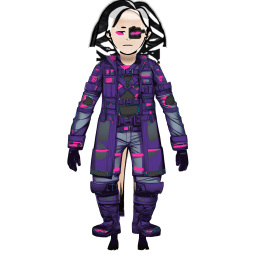
Paid: Duster, 400 scrap
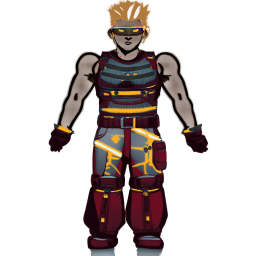
Paid: Crimson, 300 scrap
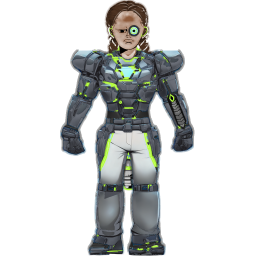
Paid: Exoframe, Spine, 1,100 scrap
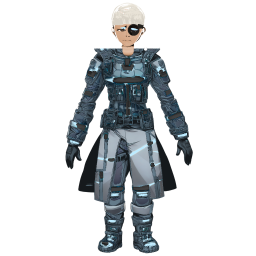
Paid: Reticle, Frost, 650 scrap
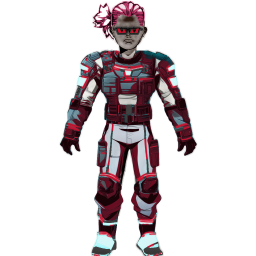
Paid: Crest, Crimson, 550 scrap
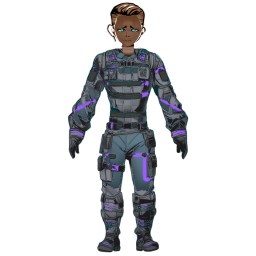
Paid: Fade, 250 scrap
One look on each build
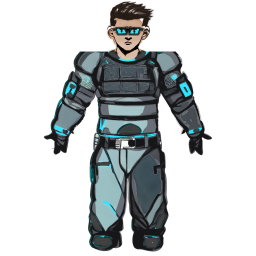
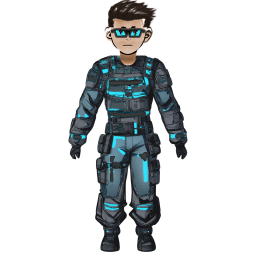
The same picks on all four builds: the Vest outfit, the Shades eye style and the Undercut hairstyle.


Start again
A character created at sign-up or at the Awakening starts in its Origin's look, saved as its first design. With no design saved, your portraits show your lineage's picture and the fight stage the default figure the creator opens on. Once one is saved, Reset to generated appears under the save button ("Back to the portrait drawn from your origin."). It asks "Reset your avatar?" first, and Reset brings the generated portrait back.
Where your avatar appears
- The top of Home, beside your name.
- The Origin panel on the Hero tab.
- The Games hub's status strip, and the fight stage, where it stands in for you in every fight.
- The Social tab, beside the box where you write a post.
- Your public profile, where it is shown in place of an uploaded photo.
The Awakening: switching from StatBlockPro to StatBlockRPG
StatBlockPro never stops counting. Every log in StatBlockPro still earns XP, levels, proficiency and streak days; the game is only hidden. The first time you switch the game on, the Awakening shows what that built.
In the appHomeSettingsApp and displayStatBlockRPGStatBlockPro
- Open the switch
In Settings, the App and display group is already open; find Mode in it. "You can switch at any time. Everything you log counts either way, so turning the game off now and on again in six months loses nothing."
- Turn the game on
Turn on StatBlockRPG. The first time, this opens "Wake your character" rather than switching straight over.
- Choose your Origin
Pick a lineage and a class under "Choose your origin". "Your origin adds to the levels you have already earned. It never replaces them."
- Wake it
Tap Wake the character. The button reads "Pick a lineage and a class" until both picks are made.
- Read the receipt
"Already yours" lists What you did (days trained, activities logged, workouts finished, meals logged, longest streak), What it built (experience earned, stat levels gained, skills levelled), Your origin and A welcome. From there, Open the character sheet or Build your avatar.
Stat levels gained counts the levels your training earned; the Origin's levels are listed on their own.
The one-off welcome
The Awakening also pays once for the days you trained before your character had an Origin: every day with at least one activity or workout logged (the food diary and the water card on Home do not count), up to and including the day you wake it.
| Days trained | Scrap | Items |
|---|---|---|
| 10 | 250 | 0 |
| 20 | 500 | 1 |
| 40 | 1,000 | 2 |
| 60 | 1,500 | 3 |
| 100 | 2,500 | 5 |
| 150 | 2,500 | 5 |
Character questions, answered
Can I change my lineage or class later?
No. Your Origin is picked once, at sign-up or at the Awakening, and there is no way to change it afterwards. It only sets where your stats begin, and every stat keeps growing from training, so a different start matters less every month.
Which lineage and class is the best?
None. Every lineage spends exactly 12 stat points and every class exactly 4, so every character starts with 22 levels in total. Pick the shape you like. If you want the most XP, Luminarch adds 5% and Archivist adds 6%; Warden gives a second party summon each day.
Is there a level cap in StatBlockRPG?
No. Stats and proficiencies level forever. Each level asks for a little more XP than the last: level 10 needs 1,600 XP to pass and level 100 needs 63,400.
Why did my second workout today earn less XP?
Every stat has a daily soft cap. The more raw XP a stat has already had today, the less each new log adds, and a stat can never gain more than its cap in one game day. It resets when the next game day starts at 4am.
How do I change my avatar?
Open the Hero tab, tap "Customise avatar" under your Origin, make your picks and tap "Save avatar". A new character starts in the look its Origin drew, so there is always something to start from. Paid styles show their scrap price and open the gear shop when tapped.
Do I lose progress if I start with StatBlockPro?
No. StatBlockPro records every log in full, and the character grows in the background. When you switch StatBlockRPG on for the first time, the Awakening shows what it built, adds your Origin on top and pays a one-off welcome in scrap for the days you trained, plus items once those days reach 20.
How do I unlock techniques?
By training. Each proficiency levels from the activities that train it, and techniques unlock at proficiency 10 and 30. A new technique drops into a free slot by itself; you carry four, or five with the class passive that adds a slot.